- 1. What actually makes a browser “agentic”?
- 2. How is an agentic browser different from a traditional or AI-assisted browser?
- 3. Why does agency change the role of the browser itself?
- 4. How do agentic browsers impact identity and access?
- 5. What are the security risks of agentic browsers?
- 6. How to enforce agentic browsing security
- 7. Are agentic browsers ready for enterprise use today?
- 8. 6 questions to ask before adopting agentic browsers
- 9. Agentic browser FAQs
Table of contents
- What actually makes a browser “agentic”?
- How is an agentic browser different from a traditional or AI-assisted browser?
- Why does agency change the role of the browser itself?
- How do agentic browsers impact identity and access?
- What are the security risks of agentic browsers?
- How to enforce agentic browsing security
- Are agentic browsers ready for enterprise use today?
- 6 questions to ask before adopting agentic browsers
- Agentic browser FAQs
What Are Agentic Browsers? An Autonomous Browsing Overview
6 min. read
Table of contents
- What actually makes a browser “agentic”?
- How is an agentic browser different from a traditional or AI-assisted browser?
- Why does agency change the role of the browser itself?
- How do agentic browsers impact identity and access?
- What are the security risks of agentic browsers?
- How to enforce agentic browsing security
- Are agentic browsers ready for enterprise use today?
- 6 questions to ask before adopting agentic browsers
- Agentic browser FAQs
Agentic browsers are web browsers that can plan and carry out tasks on behalf of a user, rather than only displaying content.
They interpret intent, take actions across websites, and persist context across sessions. Because they act with a user's identity and access, they change control, security, and responsibility.
What actually makes a browser “agentic”?
Agentic browsers differ from traditional and AI-assisted browsers in one core way: they don't just respond to user input—they interpret intent and act on it.
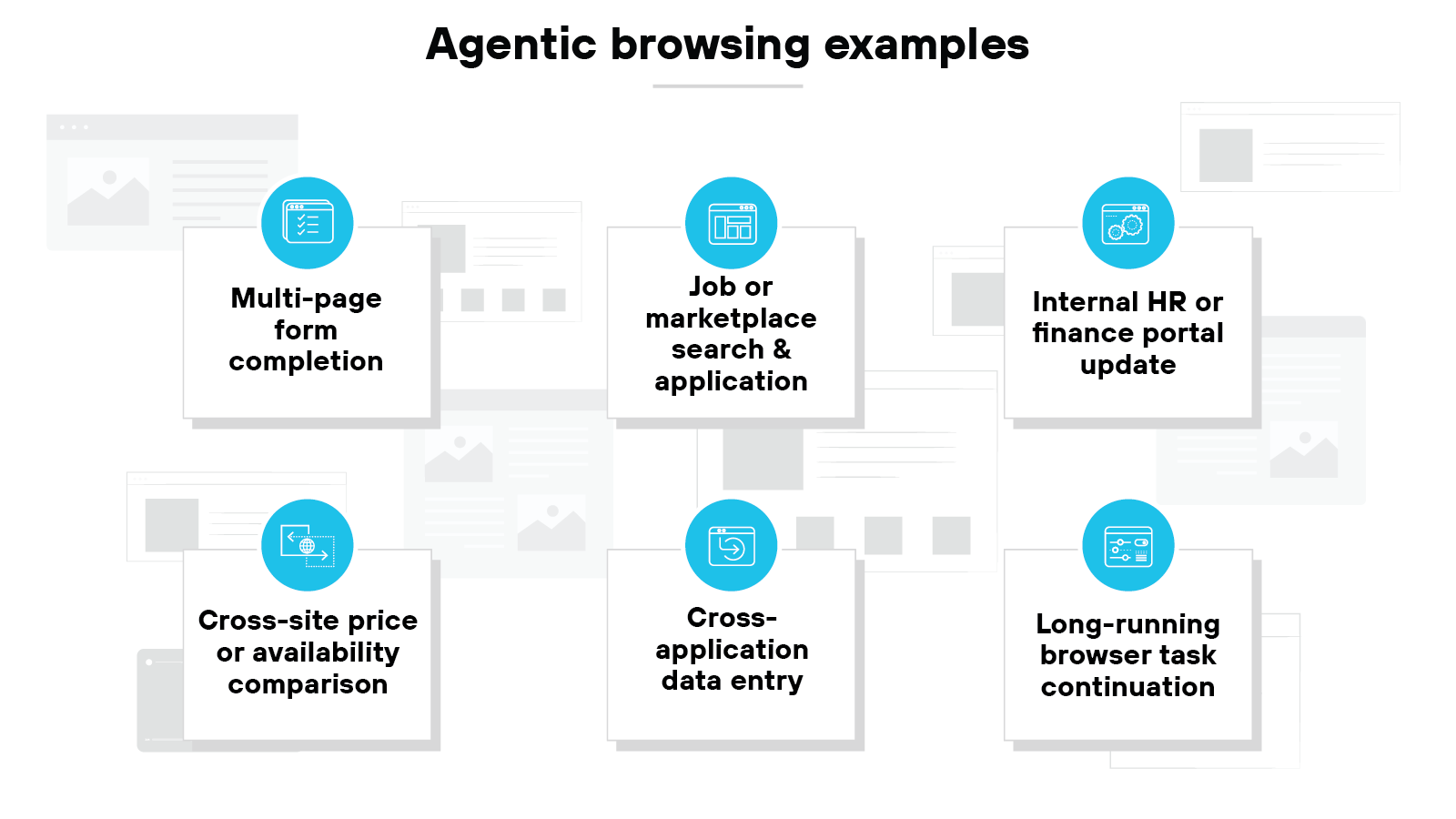
Here are some examples of how an agentic browser can interpret a goal and carry it through to completion:
- Filling out a multi-page insurance, benefits, or government form, navigating between sections, fixing validation errors, and submitting it without the user clicking through each step
- Searching job boards or marketplace sites, refining criteria as results change, opening individual listings, and completing an application or purchase once conditions are met
- Logging into an internal HR or finance portal, locating a specific record, updating required fields, attaching documents, and submitting the change for review
- Comparing prices or availability across several retail or service websites, returning to earlier pages as options change, and completing checkout when a target threshold is reached
- Moving information from emails or dashboards opened in the browser into a web-based system of record, while keeping track of what has already been entered and what still needs attention
So what actually makes this possible?
Intent interpretation is the foundation.
An agentic browser translates a goal into something actionable. Not a search query. A task. That task can span multiple sites and steps. And it can adapt as conditions change.
Which means the browser must plan.
It breaks a goal into ordered actions. It decides what comes first and what depends on what. It can pause, retry, or adjust when an action fails. This planning logic allows the browser to sequence actions and adapt when conditions change.
Execution happens at the page level.
Agentic browsers interact directly with the structure of a webpage. They read and modify page elements. They click, type, submit, and navigate based on the live state of the page. This happens through the browser itself. Not external scripts.
Agentic behavior depends on session continuity.
The browser maintains context across pages and time. It remembers what has already happened, tracks progress, and avoids repeating completed steps.
Memory plays a role here. Some context persists only for a session. Other context carries forward. Including task state and prior decisions. Without this, execution breaks down.
Agentic browsers don't act without limits. Human checkpoints remain part of the model.
Sensitive actions can require confirmation. Some steps pause execution until a user approves them. Which keeps execution bounded.
How is an agentic browser different from a traditional or AI-assisted browser?
| Traditional vs. copilots vs. AI-assisted vs. agentic browsers |
|---|
| Comparison area | Traditional browser | Copilots | AI-assisted browser | Agentic browser |
|---|---|---|---|---|
| Primary role | Displays web content | Generates responses or suggestions | Advises the user during browsing | Executes tasks on behalf of the user |
| How actions occur | Only after direct user clicks or input | After a prompt, then stop | In response to user prompts or selections | Continuously, based on a defined goal |
| Who does the work | User performs every step | User performs the work | User performs each action | Browser carries the task forward |
| Task and state continuity | No task awareness | Limited conversational context only | Minimal awareness of task progression | Maintains task state across pages and time |
| Execution responsibility | Execution belongs to the user | Execution belongs to the user | Execution belongs to the user | Execution belongs to the browser under the user's identity |
Traditional browsers display. AI-assisted browsers advise. Agentic browsers execute.
The differences come down to how work gets done:
Traditional browsers wait for direct input. They load pages, display content, and respond to clicks. Even when they include AI features, the browser itself stays passive.
AI-assisted browsers add help. Usually through a sidebar or prompt box. They summarize pages, answer questions, or generate text. Useful. But limited. These tools advise the user. They don't act for them.
In effect, the user still does the work. They decide what to click. What to type. What to submit. The AI supports the decision, but it doesn't execute it.
Copilots, which often get confused with agents, operate in a request-response loop. Ask. Answer. Repeat. They don't maintain task state on their own.
Agentic browsers manage state. They track progress. They remember what already happened. They know what still needs to be done. That is what allows multi-step execution without constant supervision.
Why does this matter?
Because the browser is no longer just an interface. It's an execution layer. Actions happen under a user's identity. Access applies to the browser's decisions, not just the user's clicks.
Agentic browsers change that model.
Instead of assisting each step, they take responsibility for the task. A user sets a goal. The browser plans how to achieve it. Then it carries out the required actions across pages and sites.
This isn't just simple automation.
Scripts and macros follow fixed rules. But agentic browsers adapt. They react to page changes. They handle interruptions. And they adjust when something doesn't work as expected.
Why does agency change the role of the browser itself?
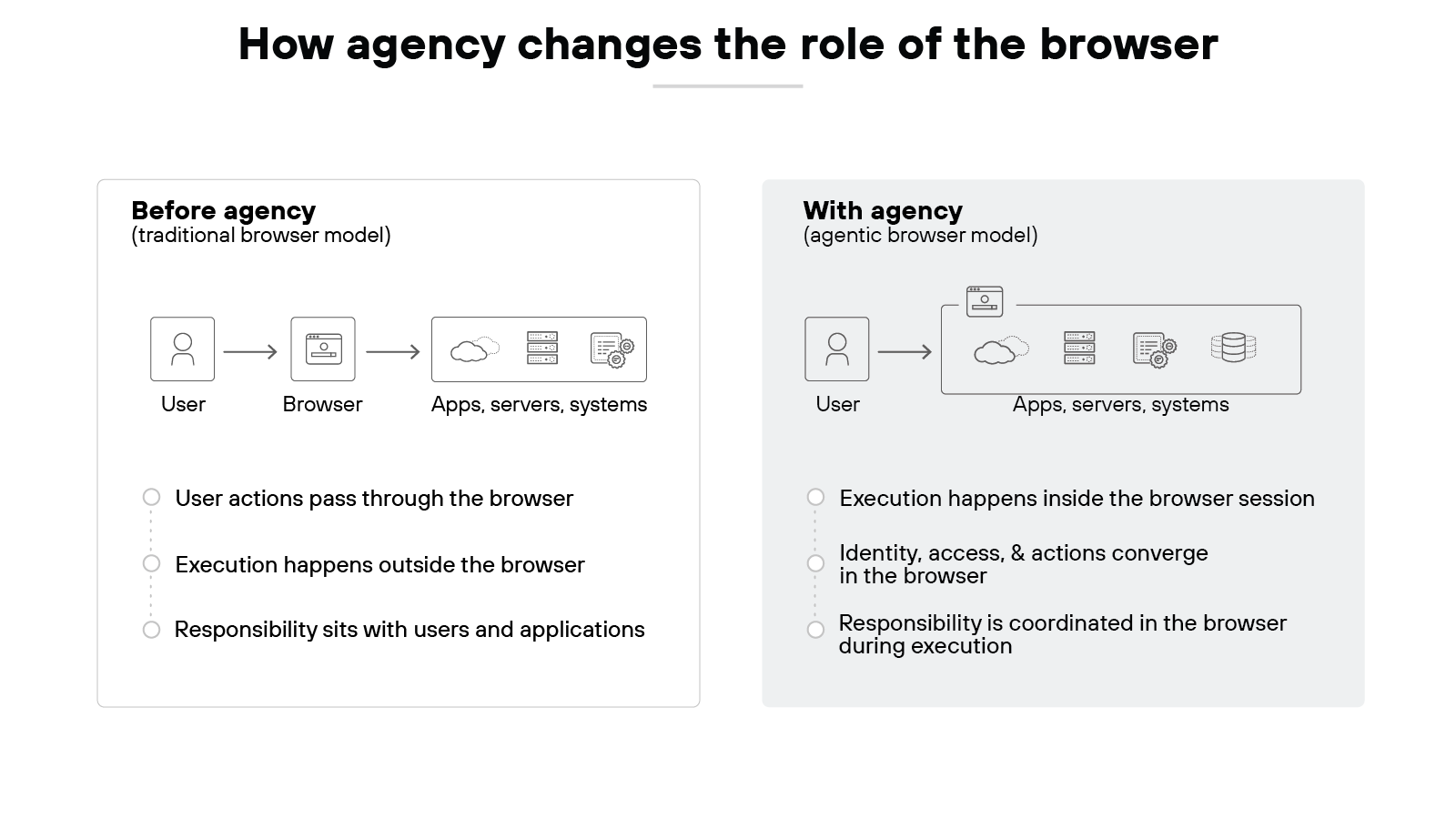
For years, the browser played a limited role. It displayed content. It passed user input along. Work happened in systems outside the browser.
That model assumes the browser never decides what happens next.
When a browser has agency, it can carry work forward on its own.
A decision made in one step can lead to actions in the next. Execution no longer waits for constant user input. It happens inside the browsing session.
For example: an agent can navigate a multi-step procurement site, compare options, adjust filters, and submit a purchase without the user manually driving each page.
Responsibility moves with execution.
Once execution happens in the browser, responsibility moves with it. The browser is no longer acting for the user in isolated moments.
Identity and access apply within the same execution context. Each action executes under the same authority that initiated the goal.
Previously separate systems now intersect during execution.
Elements that were previously separated now connect during execution. Identity was handled by access systems. Data lived in applications. Actions flowed through users. With agency, those pieces intersect while work is actively unfolding in the browser.
Why does that matter?
Control follows execution.
If actions occur in the browser, enforcement must account for browser behavior. If decisions unfold there over time, accountability attaches there as well. The browser no longer sits at the edge of the workflow. It sits in the middle of it.
This doesn't mean the browser replaces other systems. Identity providers still authenticate. Applications still store data. Networks still route traffic.
What changes is coordination.
The browser becomes the layer where responsibility for execution is coordinated during work. That shift in responsibility—not a new feature—is what fundamentally changes its role.
How do agentic browsers impact identity and access?
In agentic browsing, identity no longer functions as a one-time entry check.
Identity applies throughout execution. Actions taken by the browser are evaluated under the same authenticated context that initiated the task, not just at login.
This makes identity an active constraint during work, not a preliminary step.
Authorization changes in parallel.
Access decisions are no longer resolved once and assumed valid for the duration of a session. Each action may require re-evaluation based on current context, task state, and conditions at that moment.
Access becomes something that is assessed over time, not granted and forgotten.
What are the security risks of agentic browsers?
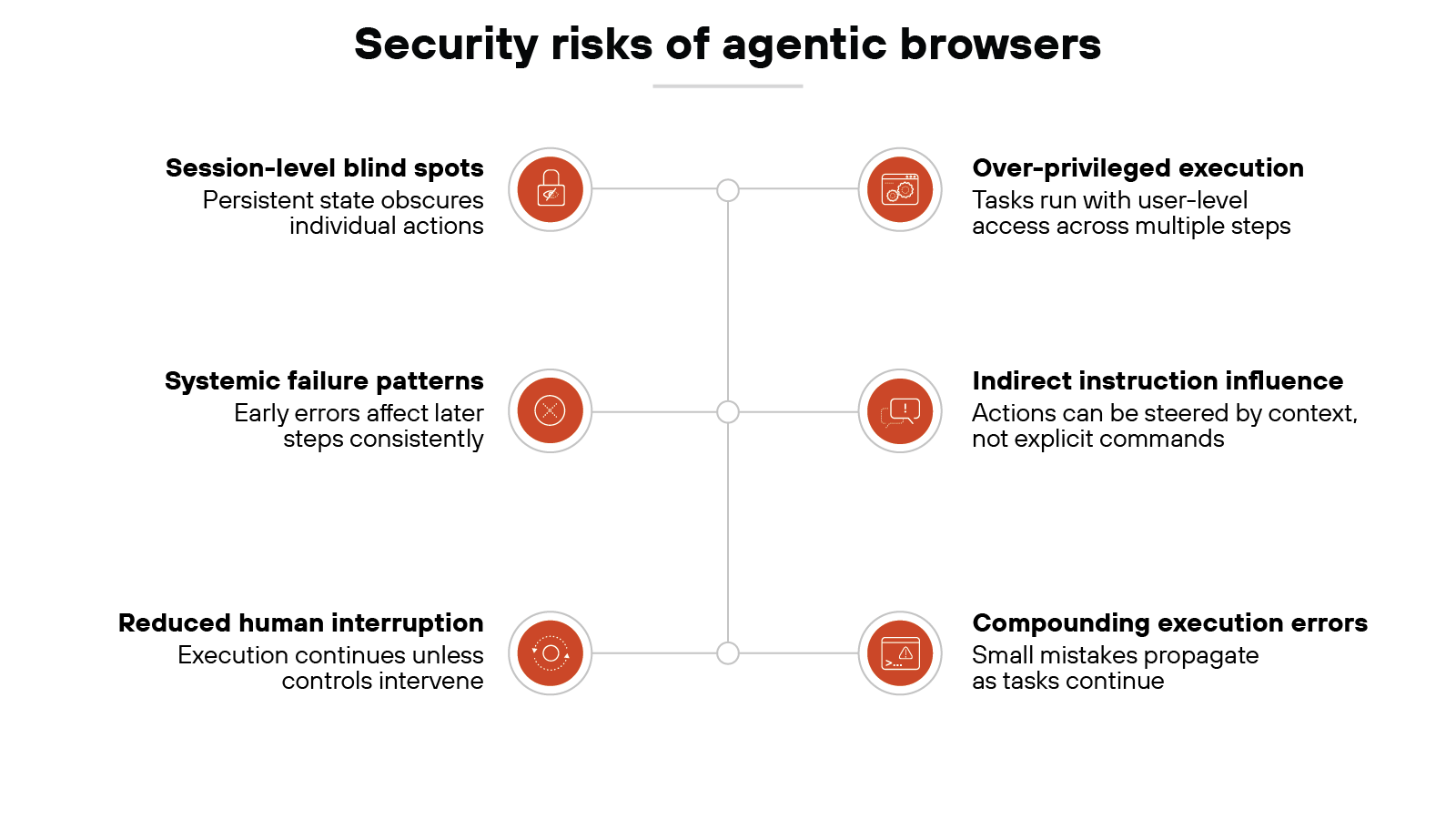
Agentic browsers introduce a different risk profile than traditional or AI-assisted browsers.
The reason is simple. They can act. And that changes how mistakes propagate and how attackers can intervene.
One risk is over-privileged automation.
An agentic browser often operates with the same access a user already has. That access may be broader than a single task requires.
When the browser executes multiple steps automatically, it can apply those privileges repeatedly. A small error can therefore affect more systems than intended.
Another risk involves prompts and indirect instructions.
Agentic browsers respond to goals and context. They also rely on signals embedded in pages, workflows, and prior actions.
Malicious or misleading instructions can influence behavior without looking like explicit commands. This makes abuse harder to spot.
The browser may treat untrusted input as part of a legitimate task. That input can redirect actions, change parameters, or trigger unintended steps. The risk doesn't depend on a single prompt. It emerges from how instructions accumulate during execution.
Session-level blind spots also matter.
Agentic browsers maintain state across pages and time. That persistence enables complex work.
It also reduces visibility into individual actions. Security tools that expect discrete user events may miss how actions connect.
This leads to another shift.
Failures are not isolated events. They're systemic.
When a browser plans, executes, and adapts, an error early in the process can influence later steps. The system behaves consistently. That consistency can amplify mistakes.
Why does this differ from traditional browsing?
In a manual workflow, users notice problems and stop. In an agentic workflow, execution can continue unless controls intervene. The risk comes from continuity, not recklessness.
It's important to stay precise here.
These risks don't imply that agentic browsers are unsafe by default. They highlight where assumptions break. Security models built around clicks and logins may not account for autonomous execution.
The key point is scope.
Agentic browsers concentrate intent, identity, access, and action in one place. When something goes wrong, it happens inside that convergence.
| Further reading: Agentic AI Security: What It Is and How to Do It
How to enforce agentic browsing security
Enforcing security in an agentic browsing environment starts by recognizing that execution now happens inside the browser session.
Which is why controls have to operate where decisions are made and actions are carried out.
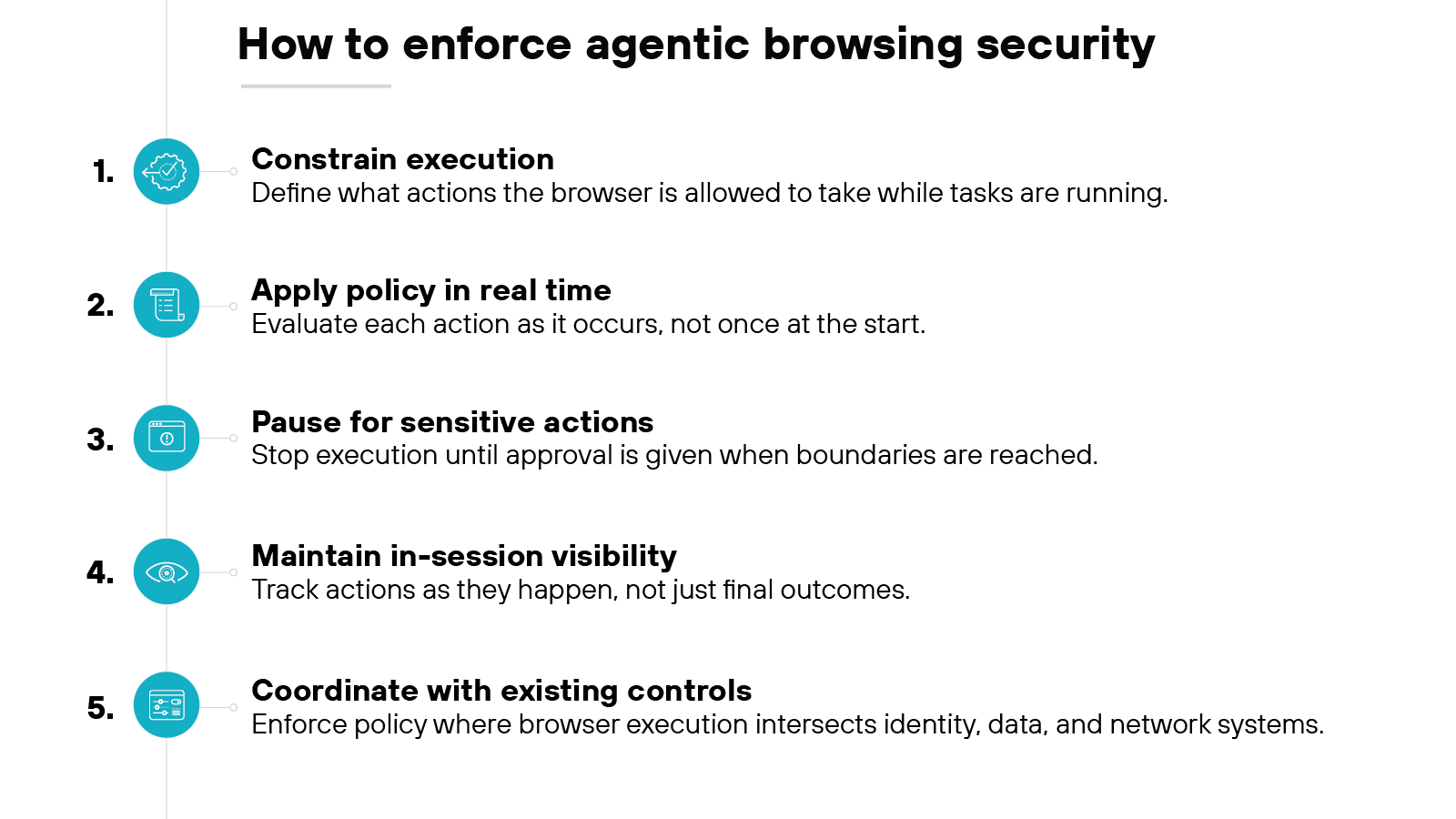
Define what the browser is allowed to do during execution.
Enforcement begins by constraining actions, not advising behavior.
The browser needs clear limits on which actions it may take, which workflows it may complete, and which operations require intervention. These constraints apply while tasks are in progress, not after they finish.
Apply policy at the moment actions occur.
In an agentic model, policy is not a static rule evaluated once. It's a condition checked repeatedly.
Each step is evaluated in context, based on current state, destination, and intent. This allows enforcement to adapt as workflows evolve.
Pause execution for sensitive decisions.
Some actions shouldn't proceed automatically.
Enforcement includes explicit checkpoints where execution stops until approval is given. These pauses are part of the control model, not exceptions to it.
Maintain visibility into execution, not just outcomes.
Effective enforcement requires awareness of what the browser is doing as it works.
Visibility tracks actions as they happen, linking each step to identity and policy. This supports accountability without waiting for failure.
Coordinate enforcement across existing systems.
The browser doesn't replace identity, data, or network controls. It coordinates with them.
Enforcement happens where browser execution intersects those systems, ensuring controls remain consistent across workflows.
In short, enforcing security in an agentic browsing environment means constraining execution as it happens. Controls operate during work, not after it. That's the fundamental shift.
| Further reading:
- What Is a Secure Enterprise Browser (AKA Secure Browser)?
- 10 Secure Enterprise Browser Use Cases [+ Examples & Tips]
- How to Choose the Best Enterprise Browser for Your Business
Are agentic browsers ready for enterprise use today?
Agentic browsers aren't universally ready for enterprise. They're selectively ready. The difference lies in workflow design, risk tolerance, and control maturity.
More specifically:
Agentic browsers are already being used. Mostly in consumer settings.
People experiment with task automation, form filling, and multi-step actions. These uses are exploratory. Low risk. Easy to stop when something goes wrong.
But enterprise environments are different.
Enterprise work involves sensitive data, regulated access, and shared systems. Tasks often span multiple applications. Actions can trigger downstream effects. In that context, agency introduces new requirements around control, visibility, and accountability.
Because of this, readiness depends on where and how the browser operates.
Some enterprise workflows can support agentic execution today. Especially those that are repetitive, well-scoped, and browser-centric. Others can't. At least not yet.
This isn't about company size.
Small organizations can face complex workflows and strict requirements. Large organizations may have narrow use cases that are easier to constrain. Applicability depends on context. Not headcount.
For example:
Workflows that rely on clear identity boundaries and limited privileges tend to be better candidates. Tasks that tolerate interruption also fare better. Long-running or highly privileged workflows demand more caution.
However, many enterprise environments still rely on controls designed for manual interaction.
They assume users notice problems and stop. Agentic execution changes that assumption. Readiness depends on whether controls can intervene during execution. Not after.
That creates a split.
Some enterprises can adopt agentic browsers in defined areas today. Others should treat them as emerging. Both positions can be reasonable.
The key is alignment.
Agentic browsers become viable for enterprise when execution, identity, and enforcement align within the browser session. Where that alignment exists, adoption can move forward. Where it doesn't, experimentation should remain bounded.
Adopting agentic browsers changes how work executes and where decisions are made. That makes adoption less about features and more about fit.
Here are the starter questions organizations should be asking before adopting agentic browsers:
Which workflows could tolerate autonomous execution today?
Where does the browser already act as the primary workspace?
Who owns decisions made during execution?
How will governance apply while tasks are in motion?
Where should execution stop without approval?
What assumptions about user behavior no longer hold?






Ultimately, organizations should evaluate agentic browsers by context, governance, and boundaries. Not by feature lists.
The right questions reveal whether agency fits today or belongs in controlled experimentation.
| Further reading:

REPORT: ENTERPRISE BROWSERS - AI-READY SECURITY FOR A MODERN WORKFORCE
Learn how browser-based security protects AI and unmanaged devices.
Download reportAgentic browser FAQs
An agentic browser is a web browser that can interpret a goal and carry out tasks on a user’s behalf. Instead of only displaying content, it plans actions, interacts with webpages directly, maintains context across steps, and executes work under the user’s identity and access.
There is no single “best” agentic browser. Suitability depends on context, including workflow complexity, risk tolerance, identity controls, and governance needs. Many offerings are still emerging, and most organizations evaluate them based on how well they align with specific tasks rather than overall capability.
Agentic browsers are not inherently unsafe, but they introduce different security risks than traditional browsers. Because they execute tasks autonomously, risks depend on privilege scope, session persistence, and enforcement at runtime. Safety depends on how controls, identity, and oversight are designed around execution.
An example of agentic behavior is a browser that can complete a multi-step task, such as logging into an application, navigating through forms, entering data, and submitting it, while adapting to page changes and tracking progress without requiring user input at every step.
Web browsers are commonly grouped into four categories: traditional browsers, which display content and respond to user input; mobile browsers, optimized for phones and tablets; text-based browsers, which render pages without graphics; and specialized browsers, such as secure or agentic browsers, built for specific use cases.


