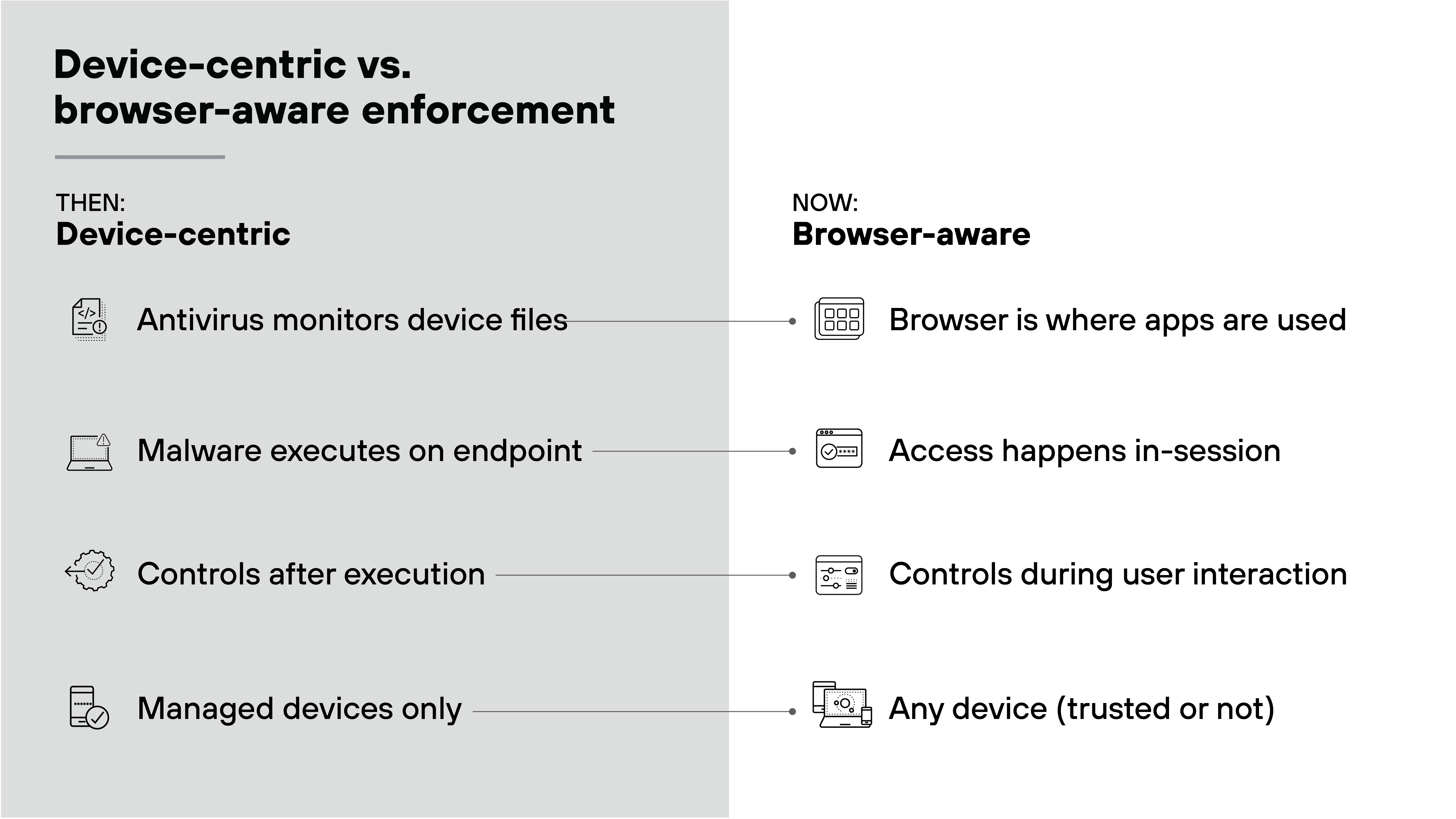
-
- Why Antivirus Does Not Stop All Modern Small Business Threats
- What Does Antivirus Actually Cover in a Modern Small Business?
- Where Antivirus Falls Out of Step with Small Business Threats
- Why The Browser Is Now the Security Perimeter for SMBs
- Where Should Security Operate in Modern Small Businesses?
- Antivirus vs. Consumer Browser vs. Prisma Browser for Business
- What Does Browser-Level Enforcement Actually Protect Against?
- Is Antivirus Worth It for Small Businesses?
- What Should Small Businesses Change About Current Security Practices?
- Effectiveness of antivirus for small businesses FAQs
Table of contents
-
What Is Cybersecurity for Small Businesses?
- Why is Cybersecurity for Small Businesses Critical?
- How Browser Security Closes Gaps Left by Traditional SMB Security Tools
- Why Browser Security Matters More Than Ever for Small Businesses
- Common Cyber Threats Facing Small Businesses
- The Business Impact of a Cyber Attack
- Essential Components of a Small Business Cybersecurity Strategy
- How Small Businesses Can Improve Browser Security
- Choosing the Right Cybersecurity Solutions for a Small Business
- Cost-Effective Cybersecurity Tips for Small Businesses
- Building a Security-Conscious Culture
- Cybersecurity for Small Businesses FAQs
-
Why Do Small Businesses Need a Secure Enterprise Browser?
- Why Small Business Browser Security is Mandatory
- SMBs as Primary Targets for Browser Attacks
- The Shift from Perimeter to Browser-Centric Security
- Critical Advantages for Small Business Operations
- How Secure Browsers Solve the BYOD Dilemma
- How SMBs Transition to a Managed Browser Environment
- Why Small Businesses Need a Secure Enterprise Browser FAQs
-
Small Business Cybersecurity Best Practices & Why They Fail
- Why cybersecurity best practices often fail in small businesses
- 1. Control access to business applications—not just user accounts
- 2. Reduce phishing risk beyond email filtering and training
- 3. Protect sensitive data where it's actually handled
- 4. Assume unmanaged and shared devices will be used
- 5. Limit trust inside the environment vs. solely the perimeter.
- 6. Maintain visibility where work actually happens
- Why the browser has become a control point for small business cybersecurity
- Small business cybersecurity best practices FAQs
-
Consumer Browser vs. Secure Browser for Small Business
- Consumer vs. Secure Browsers Explained
- Why Consumer Browsers Fail Small Businesses
- Key Advantages of Secure Browsers for Small Business
- Comparing the Mechanisms: Extensions vs. Purpose-Built Browsers
- Implementation Roadmap: Transitioning Your Small Business
- Future-Proofing Security with Browser-Based Controls
- Consumer vs. Secure Browser FAQs
-
How to Choose Browser Security for a Small Business | 2026
- Why Browser Security Matters for Small Businesses
- How to Choose Browser Security for a Small Business
- Step 1: Identify Browser-Based Risks
- Step 2: Compare Browser Security Options
- Step 3: Evaluate Core Browser Security Capabilities
- Step 4: Prioritize Phishing and Credential Protection
- Step 5: Assess BYOD and Unmanaged Device Requirements
- Step 6: Evaluate Data Loss Prevention Controls
- Step 7: Check Identity and Zero Trust Integration
- Step 8: Review Manageability for a Small IT Team
- Step 9: Consider Secure Web Gateway and Browser Isolation Needs
- Step 10: Balance Security and Productivity
- Browser Security Evaluation Checklist for Small Businesses
- Common Mistakes When Choosing Browser Security
- How Browser Security Supports Small Business Growth
Is Antivirus Enough for Small Businesses? What It Misses
4 min. read
Table of contents
Antivirus is still useful for small businesses, but it is not enough on its own. It helps detect malicious files on devices, but many modern attacks now happen through stolen credentials, browser sessions, SaaS applications, and risky user actions inside the browser. In those cases, antivirus software may never see the activity at all.
Key Points
-
Antivirus Is A Baseline Layer: Antivirus helps detect and stop known malware on devices, but it is primarily designed for post-execution malware defense. -
Modern Attacks Often Bypass The Endpoint: Many small business attacks now rely on phishing, stolen credentials, session hijacking, and SaaS misuse rather than malicious software installed on a device. -
The Browser Has Become A Control Point: Small business employees increasingly work in the browser, which is where access, data handling, SaaS use, and AI activity now happen. -
Browser-Level Enforcement Closes Critical Gaps: A secure business browser can apply policy during the session, including restricting risky actions, protecting unmanaged devices, and reducing data exposure. -
Small Businesses Need Security Where Work Happens: For many SMBs, that means keeping antivirus as a baseline while adding controls that protect browser-based work, SaaS access, and sensitive data in real time.
Why Antivirus Does Not Stop All Modern Small Business Threats
Most small businesses start asking whether antivirus is enough after something goes wrong. A phishing email lands. Someone signs in. Data is accessed. Sometimes it is copied or exfiltrated. Meanwhile, the antivirus software stays quiet. That often leads to a reasonable conclusion: either the product failed, or it was never in a position to intervene.
In many cases, it is the second one. Antivirus software is designed to detect malicious software on a device. But many modern attacks do not involve malware at all. Instead, they rely on valid credentials, browser-based access, or activity inside legitimate cloud applications. Nothing suspicious is installed locally. Nothing executes on the endpoint. So there is nothing for antivirus to inspect or block.
That is why small businesses need to evaluate security based not just on what a tool detects, but also on where it operates in the attack chain.
Prisma Browser for Business
Your secure workspace designed for small business with built-in AI controls
Learn moreWhat Does Antivirus Actually Cover in a Modern Small Business?
Antivirus plays an important role. It scans files, detects known malware, and may flag suspicious behavior when a malicious program begins to run. It focuses on activity on the device itself and assumes that the device is managed, monitored, and protected by an installed agent.
That coverage still matters. Small businesses need protection against malicious downloads, known malware, and harmful local execution. But the scope is narrow by design. Antivirus typically does not track what users do inside SaaS applications, control how sensitive data is handled in the browser, govern risky actions like copy, paste, upload, or download during a live session, or consistently protect unmanaged and shared devices.
That is not a flaw. It is simply not what antivirus software was built to do. Antivirus belongs to endpoint-focused protection rather than in-session browser control.
Where Antivirus Falls Out of Step with Small Business Threats
Small businesses rarely operate in perfectly managed environments. Employees may use personal laptops. Teams may share office computers. Contractors may need temporary access. Endpoint agents may not be installed everywhere, and even when they are, coverage is often inconsistent. Small businesses also rarely have 24/7 monitoring or dedicated incident response teams, which makes antivirus a reactive control rather than a continuous one.
At the same time, the threat model has changed. Many compromises no longer begin with malware. They begin with access. A phishing email convinces someone to sign in. Credentials are reused. A session token is captured. From there, the attacker operates inside legitimate applications like email, cloud storage, accounting tools, and CRM platforms. The activity may look like a normal user session because technically it is one.
This creates a serious gap for small businesses. If security only engages after something suspicious executes on a device, then many browser-first attacks have already succeeded before protection begins.
Why The Browser Is Now the Security Perimeter for SMBs
For many small businesses, the browser is where work happens. Employees use it to sign in to SaaS applications, access financial systems, share documents, communicate with customers, and use AI tools. That also makes it the place where phishing succeeds, credentials are misused, and sensitive data can be exposed. The live Prisma Browser for Business pages explicitly position the browser as the workspace where modern work and risk now meet.
If protection only starts after malware lands on a device, it starts too late. Modern SMB security needs to operate where work and risk meet: inside the browser session. That is where access happens, where data is handled, and where risky actions can be introduced in real time.
Where Should Security Operate in Modern Small Businesses?
Security decisions no longer happen only on the device. Increasingly, they happen in the browser. That is where employees log in to email, share client files, use collaboration tools, access billing platforms, and interact with AI tools. It is also where attackers can exploit access if nothing stands in their way.
Small businesses need security that can work during the session, while a user is clicking, typing, uploading, sharing, or accessing data. That is the moment risk is introduced, and it is the moment policy needs to be enforced. This is why the secure browser has become a logical enforcement layer for modern small business security. Not because it is trendy, but because it is where business happens now.
Antivirus vs. Consumer Browser vs. Prisma Browser for Business
Small businesses often rely on antivirus software and standard browsers together. The problem is that those tools were not built to enforce business policy inside modern browser-based work. This comparison shows where each layer helps and where gaps remain:
| Capability | Antivirus | Consumer Browser | Prisma Browser for Business |
|---|---|---|---|
| Detects known malware on the device | Yes | Limited | Yes |
| Protects against phishing during browsing | Limited | Limited | Yes |
| Protects against credential misuse in live sessions | No | No | Yes |
| Applies policy inside SaaS and web apps | No | No | Yes |
| Blocks risky actions like copy, paste, print, download, or screen capture | No | No | Yes |
| Protects work on unmanaged or personal devices | Limited | No | Yes |
| Provides browser-level visibility into user activity | No | Limited | Yes |
| Helps reduce data exposure to AI tools | No | No | Yes |
| Built for business policy enforcement | No | No | Yes |
| Useful as a baseline layer for endpoint malware defense | Yes | No | Yes, alongside browser controls |
See for yourself how Prisma Browser for Business ensures productivity never comes at the cost of security.
What Does Browser-Level Enforcement Actually Protect Against?
Browser-level enforcement helps small businesses apply controls where antivirus software cannot. It can restrict actions involving sensitive data during a session. For example, it can help prevent copy, paste, print, download, or screen capture. It can log actions taken during access, require reauthentication before sensitive activity, and apply policy without needing to trust the underlying device.
This is so important because many small businesses cannot guarantee device trust across employees, contractors, remote workers, and shared systems. Browser-based controls make it possible to protect data during use, not just after something has already gone wrong. That is what makes browser enforcement structurally different from antivirus and why many small businesses now need both.
Is Antivirus Worth It for Small Businesses?
Yes. Antivirus is still worth using. It remains an important baseline defense for detecting and stopping malicious software on devices. Small businesses should not think in terms of replacing antivirus software entirely. That would be the wrong takeaway.
The real issue is that antivirus software alone is no longer enough. Work now happens across browsers, SaaS platforms, remote access, personal devices, and shared systems. If security only engages after something runs locally, major gaps remain. That is especially true when the threat involves phishing, account misuse, session abuse, or unsafe behavior inside the browser.
So the smarter question is not whether antivirus software still has value. It does. The smarter question is whether it covers the way small businesses actually work today. On its own, it does not.
What Should Small Businesses Change About Current Security Practices?
The answer is not to keep stacking tools blindly and hope the pile becomes a strategy. Small businesses should step back and ask a few basic questions:
- Where are employees actually working?
- What devices are they using?
- When are risky actions most likely to happen?
- What controls exist at those exact moments?
Security needs to align with the way modern small businesses operate, which means recognizing that a growing share of risk appears during browser-based work. Secure browsers give small businesses a way to apply policy in real time, across devices they may not own or fully control. They make it possible to protect access, monitor behavior, and reduce data exposure where risk is introduced.
This is how small businesses move from a device-only mindset to a more practical security model built for SaaS, remote work, and browser-first operations.
Get the secure browser free for 30 days.
Only $6
per user | per month after trial
$50
annually/user
No long-term contracts. Cancel anytime during your free trial.
Start your 30-day free trialThe best antivirus for a small business depends on device types, budget, and management needs. Look for solutions that provide malware detection, basic behavioral analysis, and centralized management. But remember: even the best antivirus is still only one layer of protection. Small businesses should also think about browser activity, SaaS access, and data use.
The main issue is not that antivirus is useless. It is that its visibility is limited. Antivirus primarily focuses on malware on devices, so it may not see credential theft, browser-based activity, SaaS misuse, or risky actions inside legitimate sessions.
Yes. Small businesses are common targets because they often have fewer dedicated resources, uneven device coverage, and valuable customer, financial, and operational data. Cybersecurity should protect both endpoints and the browser-based work employees do every day.
Yes. Antivirus is still worth using as a baseline defense against malware and malicious files. The problem is not the antivirus itself. The problem is relying on it alone for a threat landscape that increasingly bypasses the device and operates through the browser.
Small businesses should consider security controls that protect browser sessions, SaaS access, sensitive data, and AI use in real time. That is especially important when employees use personal devices, shared systems, or remote access.